![logo inverted.png]](https://www.proagenda.com/hs-fs/hubfs/logo%20inverted.png?height=50&name=logo%20inverted.png)
People often want to include a group lesson section on their website so clients can easily access these sessions. This can be set up for all group appointments by adding them as links or buttons on your site. Clients can then go straight to the group appointment overview, where they can view all available dates and times.
How to find your group lesson URL
-
Log in to your Academy.
-
Navigate to Settings and select Appointment Types.
-
Locate the appointment type you wish to add to your website.
-
Click the orange icon on the right-hand side.
-
Click the copy icon next to the relevant URL.
-
You can now place this URL on your website.
What clients will see
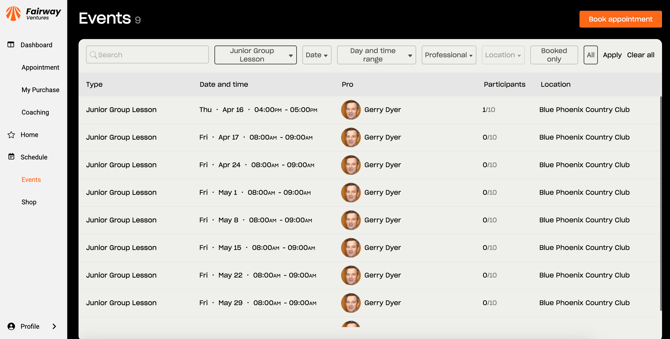
This image shows what clients will see when they click the link on your website. As the URL for the “junior group lesson” was previously copied in this example, all scheduled dates and times for this lesson are displayed in this overview. So when you use your own link, the corresponding lessons with their dates and times will appear just like above.
If you have any further questions about group lesson links or need assistance with anything, feel free to contact us or schedule an online demo.