
Experience the Future of Scheduling: The All-New ProAgenda App
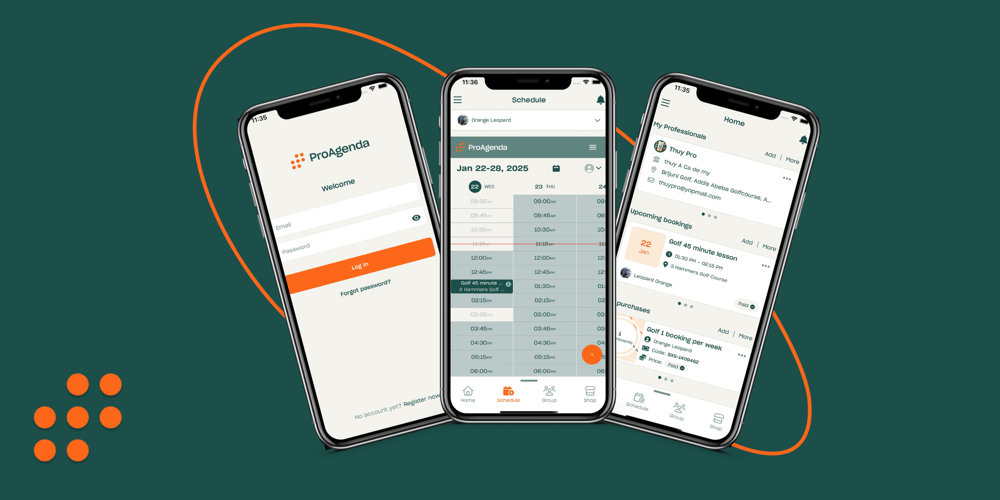
The world of scheduling just got a significant upgrade! We’re thrilled to announce the release of the all-new ProAgenda client app, featuring a completely revamped user interface (UI) designed to elevate productivity and provide an unmatched scheduling experience. Whether you’re a business professional, coach, or service provider, ProAgenda has always been a trusted companion for seamless scheduling. With this update, the app is more intuitive, visually stunning, and packed with features that make managing appointments for your clients easier than ever.
What's new in the updated UI?
The redesigned ProAgenda client app brings together functionality and aesthetics to deliver a modern, streamlined experience. Here’s what you can expect:
1. Simplified navigation: The updated UI gives the ProAgenda a new streamlined menu that helps your clients navigate bookings and administration in seconds.
2. Enhanced visual design: Say goodbye to cluttered screens and outdated visuals! The new ProAgenda client app boasts a sleek, professional design that’s easy on the eyes. From modern typography to a clean layout, every detail has been fine-tuned to enhance usability.
Why upgrade to the new ProAgenda App?
This UI update isn’t just about aesthetics; it’s about delivering real value to our users. By making the client app easier to navigate and more visually appealing, we’re empowering you to:
-
Save Time: Manage appointments effortlessly, so your clients can focus on what matters most - their lessons.
-
Boost Productivity: With a clear and customizable dashboard, they’ll have all the tools they need to stay organized and efficient.
-
Impress Clients: A sleek, professional interface enhances your brand image and shows clients that you’re serious about your business.
How to get started:
Ready to experience the new ProAgenda app? Updating is simple:
-
Download the Update: Visit the App Store or Google Play to update to the latest version of ProAgenda.
-
Explore the Features: Take a moment to explore the redesigned interface and try out the new customization options.

Managing Director & Product Expert at ProAgenda. Jordy has worked in the golf industry for more than fifteen years. As product owner, he developed ProAgenda from a standalone scheduling tool into a complete booking and management platform for golf businesses. He shaped the product through conversations with countless golf academies and industry partners such as Lightspeed and Foregroup.

More than one sport?
Do you have multiple sports disciplines within your academy? Check out the multisport case and read how ProAgenda can help you manage them all!
Frequently
Asked
Questions
The all-new ProAgenda app offers a redesigned, mobile-first interface featuring instant 24/7 self-service lesson booking, persistent user login, real-time schedule synchronization, push notifications for reminders, and integrated video recap access for students.
The app eliminates booking friction by allowing students to view real-time instructor availability, purchase lesson packages, reserve time slots, and complete payments in just a few taps on their smartphones without needing a desktop web browser.
The app sends automated push notifications directly to students' lock screens 24 to 48 hours before their session. These timely reminders confirm appointment details and cancellation terms, significantly reducing forgotten sessions and no-shows.
Yes, instructors can manage their complete calendar on the go—including adding or rescheduling lessons, blocking personal time, checking student profiles, tracking remaining package credits, and uploading post-lesson video notes directly from their mobile device.
Having the ProAgenda app on a student's home screen keeps the academy top-of-mind. The seamless self-service experience encourages golfers to book follow-up sessions more frequently and review swing analysis notes right after practice.
Yes, the ProAgenda app is fully optimized and available for download on both Apple iOS (App Store) and Android (Google Play Store), ensuring all academy clients have equal, frictionless mobile access.
Get 30 day free access to our platform.
Start your free trial, set up your account, and be ready for business. No strings attached.