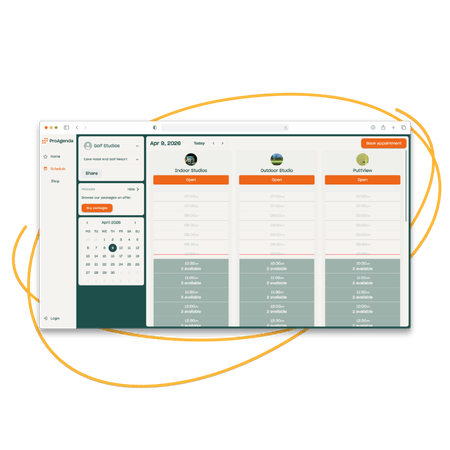
A booking page that looks like you built it

Your ProAgenda booking page features your name, logo, and services. Clients see your availability in real time, pick a slot, pay, and receive a confirmation - in under two
minutes.

  • Services, prices, and availability all in one view
  • Confirmation email sent immediately on booking
  • Custom URL: yourname.proagenda.com

Design images website (3)

Smart availability. No conflicts.

Buffer times, travel time, resource availability, and coach calendars are all factored in
automatically. Clients only see slots that are genuinely available.

  • Integration with Google Calendar and iCal
  • Multiple coach calendars synced
  • Buffer times configurable per service


Bay reservations-2

Reminders that cut your no-shows

ProAgenda automatically sends booking confirmations and reminders at the intervals you choose. No-show rates drop. Revenue is protected.

  • Confirmation email on booking
  • Reminder email and/or SMS 24h and 1h before
  • Cancellation policy shown and enforced


illsrt_8

Built for groups, lessons, and facilities

Whether you are booking a private lesson, a group clinic, a simulator bay, or an online
coaching call - ProAgenda handles all of them from the same system.

  • Online and in-person services on one page
  • Resource allocation is built in
  •  Private and group session types


Ontwerp zonder titel-Apr-09-2026-08-32-48-7971-AM

Frequently
Asked
Questions

Yes. Your ProAgenda booking page can display availability for your entire team. Clients can either choose a specific coach or book with whoever is available. You control
whether coach selection is shown to clients or handled behind the scenes.

Yes, if you enable it. You can allow clients to reschedule or cancel directly from their
confirmation email or account, subject to your cancellation policy window. If they cancel inside the window, your cancellation fee is charged automatically.

You can set up group sessions with a maximum participant count. As clients book in, the available spaces decrease in real time. When the session is full, it no longer appears as bookable. You can also set a minimum number of participants before a session is
confirmed.


Yes. You can block any time in your ProAgenda calendar - holidays, personal
appointments, maintenance windows - and those slots will not be shown as available to
clients. You can also set recurring blocks for regular unavailability.

Yes. ProAgenda integrates with Google Calendar and supports iCal export, so your
bookings can appear in whichever calendar app you already use. Changes made in
ProAgenda sync automatically.

Don't let another day of manual scheduling slow your growth. Whether you are a solo coach or running a multi-location academy, ProAgenda is built to scale with your ambition.

Fill out the form below to see exactly how ProAgenda can be tailored to your specific workflow. Our team will show you how to automate your admin, reclaim your time, and get back to what matters most.

Trusted globally by more than 2,000 top golf professionals